What It Actually Takes to Learn Web Design in 2026 (Coding, AI Tools, WordPress & Realistic Timelines)
9/2/2026
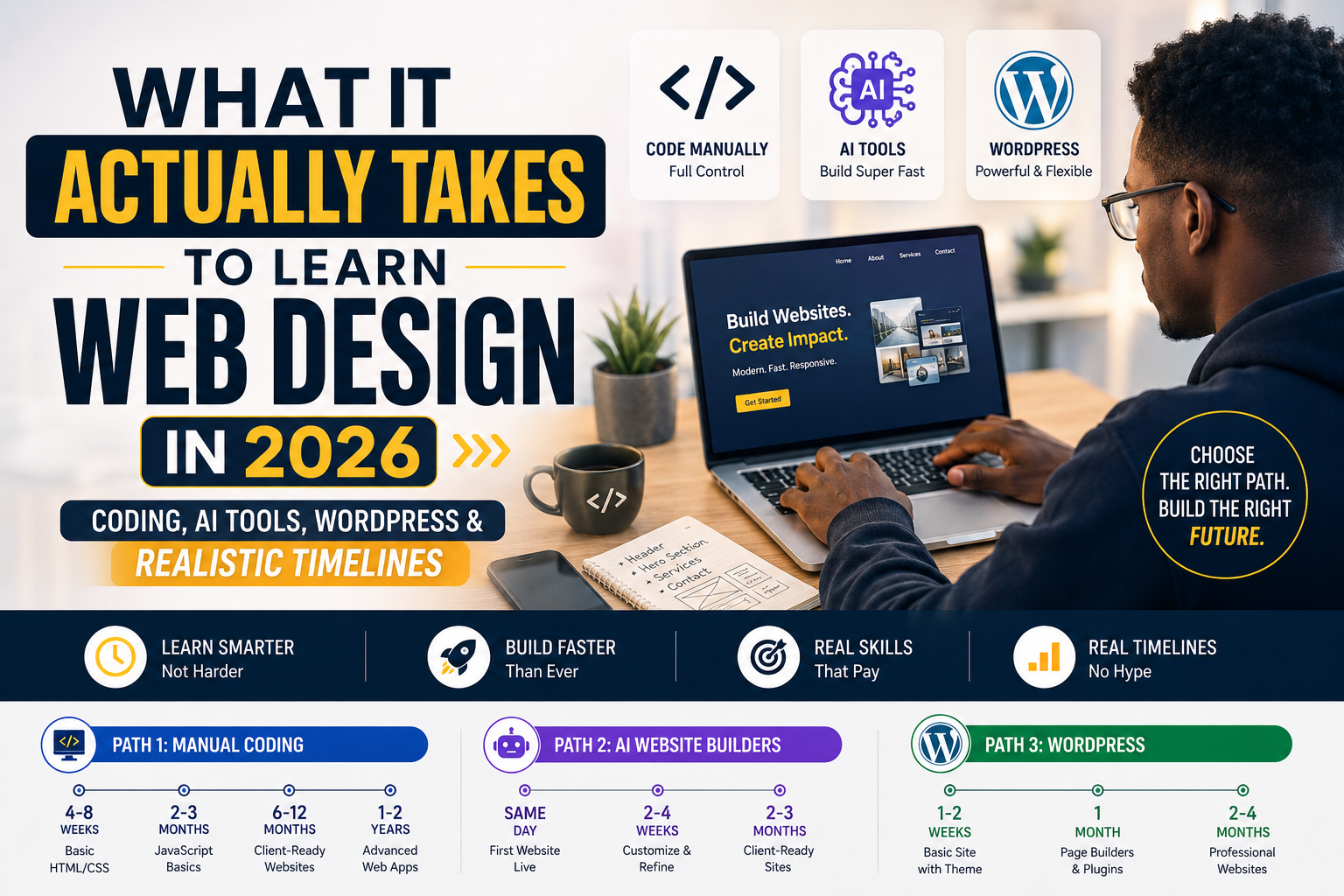
How long does it take to learn web design?" is one of the most searched questions by people looking to start a career, build a side business, or simply create a website for themselves. The honest answer depends entirely on which path you choose — and in 2026, there are more paths than ever. Here's a clear breakdown of each one, what it actually involves, and how long it realistically takes. Path 1: Manual Coding (HTML, CSS, JavaScript) This is the traditional route — writing the actual code that builds a website from scratch. What it involves: Learning HTML (structure) and CSS (styling) first Learning JavaScript for interactivity Eventually learning a framework like React if you want to build more advanced, app-like websites Understanding responsive design so sites work on mobile and desktop Realistic timeline: Basic HTML/CSS to build a simple static site: 4–8 weeks of consistent practice Comfortable with JavaScript basics: another 2–3 months Confident enough to build client-ready websites: 6–12 months Strong enough for complex, custom web applications: 1–2 years Who this is for: People who want deep control over every detail, plan to build custom or complex web apps, or want a long-term career in software/web development. It's the slowest path but gives you skills no AI tool or template can fully replace. Path 2: AI Website Builders Tools like AI-powered site generators let you describe what you want in plain language and get a working website in minutes. This is the fastest-growing path in 2026, and it's how many freelancers and agencies — including us — now deliver websites quickly. What it involves: Learning how to write clear, specific prompts to get the design you want Understanding basic layout and design principles so you can guide and refine the output Learning to edit and customize what the AI generates, since raw AI output often needs adjustment Understanding hosting, domains, and basic SEO to actually launch the site properly Realistic timeline: Building your first working website: same day Comfortable customizing and troubleshooting AI-generated sites: 2–4 weeks Skilled enough to deliver polished, client-ready sites consistently: 2–3 months Who this is for: People who want to launch fast, freelancers who want to serve clients without years of coding study, or business owners who just need a working site without hiring someone. The tradeoff is less granular control compared to manual coding — you're guiding the tool rather than writing everything yourself. Path 3: WordPress WordPress still powers a huge share of the world's websites, and it remains a solid middle ground between full coding and AI generation. What it involves: Learning the WordPress dashboard and how pages/posts work Learning to use themes and page builders (like Elementor) to design without code Understanding plugins for things like contact forms, SEO, and e-commerce Some basic CSS knowledge helps for custom tweaks, though it's not required for most sites Realistic timeline: Building a basic site with a theme: 1–2 weeks Comfortable using page builders and plugins confidently: 1 month Skilled enough to build varied, professional sites for others: 2–4 months Who this is for: People who want more customization than AI tools currently offer, without needing to learn to code. It's also useful if a client specifically wants a WordPress site they can manage themselves afterward. Which Path Should You Choose? If your goal is: speed and getting a business online fast → AI website builders. If your goal is: building a freelance or small agency service like ours → a mix of AI tools and WordPress covers most client needs efficiently. If your goal is: a long-term software development career → manual coding is worth the longer investment. The Realistic Truth About Timelines Be cautious of anyone promising you'll be a "professional web designer in 2 weeks." What's true is that you can build a working, presentable website in days using modern tools — but building the judgment to design well, structure a site for conversions, and troubleshoot problems takes months of real practice, regardless of which path you pick. The tools have gotten dramatically faster; the skill of knowing what a business actually needs from its website has not gotten any easier to learn. How We Do It at Elizeh Digital We combine AI-powered site generation with hands-on customization and WordPress where it fits the client's needs best — which is exactly why we can deliver a professional landing page in 3 days instead of weeks. If you'd rather skip the learning curve entirely and just get a website built for your business, that's exactly what we do. Frequently Asked Questions Is coding still worth learning in 2026, now that AI can build websites? Yes, but for different reasons than before. AI tools handle most standard website needs quickly, but coding knowledge still matters for custom functionality, fixing issues AI tools can't solve, and building more advanced web applications. Think of it less as "required" and more as a skill that separates good developers from great ones. Can I learn web design for free? Yes. Free resources exist for every path — HTML/CSS tutorials, WordPress documentation, and free tiers of most AI website builders. The main cost isn't money, it's the time it takes to practice consistently. Do I need to know how to code to use AI website builders well? No, but a basic understanding of layout and design principles helps you guide the AI toward better results and know what to fix when something looks off. Which path is fastest to start earning money as a freelancer? AI website builders combined with basic WordPress skills is usually the fastest route to taking on paying clients, since you can start delivering real websites within 2–3 months rather than a year or more. Is WordPress still relevant in 2026 with AI tools available? Yes. WordPress remains useful for clients who want more customization than most AI tools currently offer, or who want to manage and update their own site afterward using a familiar dashboard. What's the biggest mistake beginners make when learning web design? Jumping between too many tools and tutorials without finishing a real project. Picking one path, building a complete website — even a simple one — and launching it teaches far more than months of scattered tutorials.
Your competitors are already online. Let's put you ahead of them.